How it Works
Slacker has a minimal AWS footprint, consisting of a Python-based AWS Lambda function and two small DynamoDB tables. It includes a CLI to test, validate and manage configuration data held in the DynamoDB tables.
Slacker uses Slack's incoming webhooks custom integration mechanism to send messages.
Note
Token based webhooks are a legacy integration method but they work just fine.
The architecture is simple:

Notes
- The slacker Lambda does not need to run within a VPC.
- EventBridge can send messages to slacker, either directly or via SNS.
The Sending Process
The sending process is:
-
Message Publishing
A message is published by the originating AWS source (e.g. SNS) to the slacker Lambda function.
-
Slack Webhook Lookup
Slacker looks up the source ID (e.g. SNS topic ARN) in the DynamoDB webhooks table and obtains the URL of the Slack webhook and some other control information. If the source ID is not found in the webhooks table, the wildcard webhook is used, if present.
-
Rules Processing
Slacker processes the message against any rules specified in the webhooks table to decide if the message should be discarded, diverted, or modified prior to sending.
-
Message Sending
Slacker uses the webhook URL to send the message to Slack.
The Webhooks Table
The webhooks table is a DynamoDB table named slacker.webhooks. It maps AWS
message source IDs to Slack webhook URLs. All sources
feeding messages to slacker must have an entry in the table.
Note
The name of the table made more sense when slacker was young. Stuck with it now.
The table must be created with sourceId as the primary partition key. The
table is created as part of a standard installation.
The table contains the following fields.
| Name | Required | Type | Description |
|---|---|---|---|
| #... | No | Any | Any field with a name starting with # is treated as a comment and ignored by slacker. |
| account | Note 1 | String | The AWS account ID into which the webhook is deployed. |
| channel | Note 2 | String | An alias for a Slack webhook URL that will be looked up in the channels table. This can be overridden in individual message rules to redirect a message. |
| colour | No | String | Slack messages will have a colour bar displayed down the left margin specified by the value of this field. This can be any hex colour code (prefixed with #), or one of the Slack special values good, warning, or danger. The default value is a light grey #bbbbbb unless overridden by the SLACKER_COLOUR environment variable. |
| enabled | No | boolean | If false, sending from this source to Slack is disabled. Default is true. |
| preamble | No | String | A fixed text preamble for all messages. The most useful values are things such as <!here> and <!channel> which will cause Slack to insert @here and @channel alert tags respectively. |
| rules | No | List | A list of rules that can control whether a message is sent, or not, and the content of the message. See Message Rules. |
| sourceId | Yes | String | The source ID for the AWS message source. See Message Sources below. |
| url | Note 2 | String | The full URL of the Slack webhook. Deprecated. Use channel instead. |
| x-* | No | Any | Any field with a name starting with x- / X- is ignored. These can be used for metadata for things such as CI/CD tools. |
Notes
-
The
accountfield is not used by the slacker Lambda function. It is used by the slacker CLI to ensure that webhook entries are not accidentally deployed into the wrong account. -
One of
channel(preferred) andurlmust be specified. -
Slacker caches webhook entries for 5 minutes. Table updates can take this amount of time to become effective. The duration can be changed by setting the
SLACKER_CACHE_TTLenvironment variable. -
coloris accepted as an alternative tocolour. Don't get me started.
Tip
A JSON schema definition is available for webhooks table entries. Some IDEs (e.g. the JetBrains suite) will use the schema definition to provide auto-completion, dynamic validation etc.
To use it, include the following element in entries:
$schema: https://jin-gizmo.github.io/slacker/schemas/latest/webhook.schema.yaml
sourceID: ...
Replace latest with vN (e.g. v2) to get a versioned schema.
{
    "$schema": "https://jin-gizmo.github.io/slacker/schemas/latest/webhook.schema.json",
    "sourceId": "..."
}
Replace latest with vN (e.g. v2) to get a versioned schema.
Note that the slacker CLI will add the $schema entry when downloading from
DynamoDB and strip it when deploying to DynamoDB.
The Channels Table
The channels table is a DynamoDB table called slacker.channels. It provides an
arbitrary alias for Slack webhooks. The channel field in a
webhooks table entry is used to obtain the actual Slack
webhook URL from the channels table.
The channel can be the Slack channel name corresponding to a given webhook,
but it does not have to be. An alternative scheme could, for example, use
functional labels such as priority-1-alerts as the channel alias. Slack
itself only ever knows about the webhook URL.
The channels table contains the following fields.
| Name | Required | Type | Description |
|---|---|---|---|
| #... | No | Any | Any field with a name starting with # is treated as a comment and ignored by slacker. |
| channel | Yes | String | An alias for a Slack webhook URL. This can be referenced in the webhooks table. |
| url | Yes | String | The full URL of the Slack webhook. |
| x-* | No | Any | Any field with a name starting with x- / X- is ignored. These can be used for metadata for things such as CI/CD tools. |
Note
Slacker caches channel entries for 5 minutes. Table updates can take this
amount of time to become effective. The duration can be changed by setting
the SLACKER_CACHE_TTL environment
variable.
Tip
A JSON schema definition is also available for channels table entries. although the entries are so simple that it's hardly worth the bother.
For what it's worth, to use it, include the following element in entries:
$schema: https://jin-gizmo.github.io/slacker/schemas/latest/channel.schema.yaml
channel: ...
Replace latest with vN (e.g. v2) to get a versioned schema.
{
    "$schema": "https://jin-gizmo.github.io/slacker/schemas/latest/channel.schema.json",
    "channel": "..."
}
Replace latest with vN (e.g. v2) to get a versioned schema.
Message Sources
See also Adding Message Sources.
Incoming messages may come from a number of sources. Slacker needs to identify the source to determine the processing and routing rules that should be applied.
The value of the sourceId field of the webhooks table
is used to select the appropriate rule set. It is dependent on the source type.
| Source | Value of sourceId |
|---|---|
| CloudWatch Logs | logs: followed by the log group name (e.g. logs:/var/log/messages). |
| SNS | SNS topic ARN. |
| Amazon EventBridge (via SNS) | SNS topic ARN. |
| Amazon EventBridge (direct, no input transform) | events: followed by the source field from the event message (e.g. events:aws.rds) |
| Amazon EventBridge (direct, with input transform) | Value of the SlackerSourceId field in the constructed message. |
| Direct Invocation | Value of the SlackerSourceId field in the input message. |
Message Rules
A webhooks table entry may contain a rules key that can
filter and reformat messages.
If there is no rules key, messages are sent to Slack, unfiltered and
unmodified.
If present, the rules key contains a list of individual rules that are
processed in order. The first matching rule decides the treatment of the message
and the subsequent rules are ignored. If no rules match a message, the message
is sent to Slack unmodified.
Tip
Slacker's fallback position is to always deliver the message to Slack unless a correctly operating rule directs some other action. This means that errors in rules are generally not serious. It also means that rule sets can start out simple (or empty!) and be augmented over time.
Messages sent to slacker from AWS related events are of two kinds.
- Object messages: These are JSON encoded objects. Slacker will decode the JSON into an object when processing the rules. The attributes of the object are then available for use in Jinja rendered constructs for message filtering and reformatting.
- Text messages: These are arbitrary text messages. Slacker can optionally apply a Python regex containing capture groups to these messages to extract named or positional attributes for use in Jinja rendered constructs for message filtering and reformatting.
Each rule is an object (dictionary) that may contain the following keys:
| Key | Description |
|---|---|
| #... | Any field with a name starting with # is treated as a comment and ignored by slacker. |
| action | The action to take if the rule selects the message. Possible values are drop (discard the message) and send. The default is send. |
| channel | If the rule selects the message, override the channel to which the message is sent. |
| colour | If the rule selects the message, override the default colour for the Slack sidebar. color is also accepted. |
| if | A Jinja template that is rendered using the attributes from an object message or the regex capture groups matched from a text message to produce a truthy value. If the truthy value is true, the rule applies to the message, otherwise the rule is skipped. |
| match | A regex that will be applied to text messages using Python's re.search(). If the message is an object message, or does not match the regex, the rule is skipped. The results of the match are made available as Jinja rendering variables for use in if and template generation. See Regular Expressions in Rules. |
| preamble | If the rule selects the message, override the default preamble for the Slack message. |
| template | A Jinja template used to generate the actual message to be sent to Slack. This is rendered with the attributes from an object message or the regex capture groups matched from a text message. If the rendering process fails for any reason (e.g. malformed Jinja), the rule is skipped. If not specified, the original incoming message text is used as the message content. |
Tip
Rules can be tested locally using the slacker CLI.
The rule processing flow is shown below:

Jinja Rendering
These components of the message rules are Jinja rendered:
-
ifpredicates used to determine whether or not the rule applies. -
templatespecifications used to generate the content of the Slack message.
Slacker makes the following rendering parameters available:
| Parameter | Description |
|---|---|
| aws | A dictionary of AWS related helper utilities as follows... |
| aws.account_id | The AWS account ID. |
| aws.account_name | The AWS account alias, if the account has one, otherwise the AWS account ID. This can be overridden by setting the AWS_ACCOUNT_NAME environment variable on the slacker Lambda. |
| aws.Arn | A class that takes an ARN and makes the individual components available as the following attributes: partition, service, region, account, resource. e.g. {{ aws.Arn("arn:aws:sns:us-east-1:123456789012:xyzzy").region }} is us-east-1. |
| aws.region | The AWS region name (e.g. us-east-1). |
| data | Object containing attributes extracted from the source message by a match regex applied to a text message or the decoded content of an object message. |
| datetime | The Python datetime.datetime module. |
| date | The Python datetime.date module. |
| link() | A function that takes a URL and optional text argument and generates Slack compatible hyperlink syntax. e.g. link('https://example.com') or link('https://example.com', 'Visit example.com') |
| msg | An object containing attributes associated with the incoming message as follows... |
| msg.slacker_id | A unique identifier for the message that can be used to find the full original message contents. See Logging. |
| msg.source_id | The webhook sourceId. |
| msg.source_name | The webhook source name. If set, this is generally a slightly more human friendly version of the sourceId. |
| msg.subject | The message subject, if any. |
| msg.text | The original message text. |
| msg.timestamp | An epoch timestamp for the message. |
| now() | A function that takes an optional timezone name (default UTC) and returns a timezone aware Python datetime object. e.g. now() or now('Australia/Melbourne'). |
| re | The Python re (regex) module. |
| current_time() | A function that takes an optional timezone name (default UTC) and returns the current time as a string of the form HH:MM:SS. e.g. current_time('UTC') or current_time('Australia/Melbourne'). |
| tz | The python ZoneInfo module. e.g. tz('Australia/Melbourne'), tz('UTC'). |
Regular Expressions in Rules
Message rules may contain a match key that specifies a Python style regular expression (regex) that will be applied to text messages. If the regex matches, the rule is selected (subject to any if condition).
Info
Python's re.search()
is used. i.e. Matches are not anchored to the beginning of the string by
default.
Regexes are not applied to object messages.
The regex may contain either named, or unnamed capture groups, but not both. Named groups are much safer for anything other than the simplest of patterns.
The results of the match are made available to the Jinja rendering
process as the data object.
If the regex contains named groups using the (?P<name>...) syntax, the data
object passed to the Jinja rendering process is a dictionary
containing all the named subgroups of the match, keyed by the subgroup name.
If the regex contains only unnamed groups, the data object passed to the
Jinja rendering process is a tuple containing all the
subgroups of the match.
If the regex does not contain any groups, the data object passed to the Jinja
rendering process is a string containing the matched string.
The Wildcard Webhook
The wildcard webhook is a webhooks table entry with a
sourceId of *.
It has two roles:
-
Webhook of last resort: If an incoming message has a source ID that doesn't match any entry in the webhooks table, the wildcard webhook is used to process the message.
Without a wildcard webhook, the message would otherwise be dropped.
-
Container for common webhook rules: Any rules in the wildcard webhook are implicitly appended to the rules of all other webhooks.
This provides a single location for common rules that would otherwise need to be repeated in individual webhooks. Only the
rulescomponent of the wildcard webhook is used in this instance. Other fields are ignored.
Notes
- The wildcard webhook is optional. If there is no wildcard webhook, incoming messages with an unmatched source ID will be dropped.
- To prevent a specific webhook from implicitly falling through to the
wildcard webhook rules, add an unqualified
send(ordrop) rule to the end of the former's rule list.
Tip
A sample set of rules for the wildcard webhook is provided in the rule library.
Message Logging
If slacker is configured to log messages
in CloudWatch, entries like this are written to log group /aws/lambda/slacker:
{
  "message": "...",
  "slackerId": "AAECPR9qbwTqaD3o",
  "sourceId": "arn:aws:sns:us-east-1:...",
  "sourceName": "SNS:...",
  "subject": "Whatever",
  "timestamp": 1749106337.055,
  "type": "incoming"
}
On rare occasions, it is helpful to be able to see the original message detail. This is easy to do using the details from the message footer in Slack, as shown below.
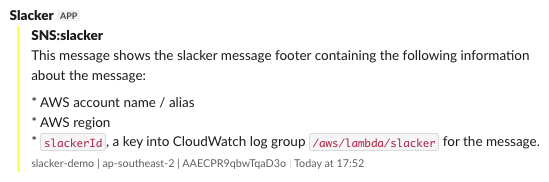
The footer contains:
- AWS account name / alias (
slacker-demoin this example) - AWS region (
ap-southeast-2) slackerId, (AAECPR9qbwTqaD3o) a key into the CloudWatch log group/aws/lambda/slackerfor the message.
The first two indicate where to find the /aws/lambda/slacker log group. The
slackerId will locate the original message within that log group using the
following search syntax in the CloudWatch logs console:
{ $.slackerId="AAECPR9qbwTqaD3o" }
Alternatively, the following CloudWatch Logs Insights query can be used:
fields @timestamp, @message
| filter slackerId="AAECPR9qbwTqaD3o"
Time Based Rules
Slacker can effectively enable or disable message rules at specific times of
day, or days of the week, by combining the if attribute of a message
rule with the various date / time functions provided as part of
the Jinja rendering process.
Time based rules can also be used to alter the way in which messages are handled
at different times. For example, messages can be diverted to a different Slack
channel it different times of day by adding a time based condition and an
override channel to specific rules.
For example, the following rules would cause messages to be dropped outside of business hours in Sydney.
rules:
  - '#': Drop all object messages outside business hours
    if: >-
      {{
        now("Australia/Sydney").weekday() > 4
        or
        not "08:00:00" <= current_time("Australia/Sydney") <= "18:00:00"
      }}
    action: drop
  - '#': Drop all text messages outside business hours
    match: '.'
    if: >-
      {{
        now("Australia/Sydney").weekday() > 4
        or
        not "08:00:00" <= current_time("Australia/Sydney") <= "18:00:00"
      }}
    action: drop
Note that the if element is only evaluated for object messages. The first
of the rules above handles messages that arrive at slacker as JSON blobs. These
are automatically converted to object messages by slacker.
For text messages, we must force slacker to convert these to an object
message by specifying a match element. The second rule contains a trivial
regex that will match all text messages. See Regular Expressions in
Rules for more information.