Lava Architecture
Each lava realm has the following components:
-
A few DynamoDB tables.
-
S3 locations for payloads and job outputs.
-
One or more SQS queues to feed jobs to workers.
-
One or more workers.
-
Zero or more dispatchers.
-
Auxiliary components, such as IAM roles, SNS topics for notices etc.
-
Optional Lambda functions for triggering jobs from S3 events and assisting external programs to request job dispatches.
-
A few other AWS bits and pieces.
Most of these components are created by the CloudFormation templates provided with lava. See Installation for more information.
A typical realm configuration is shown below.
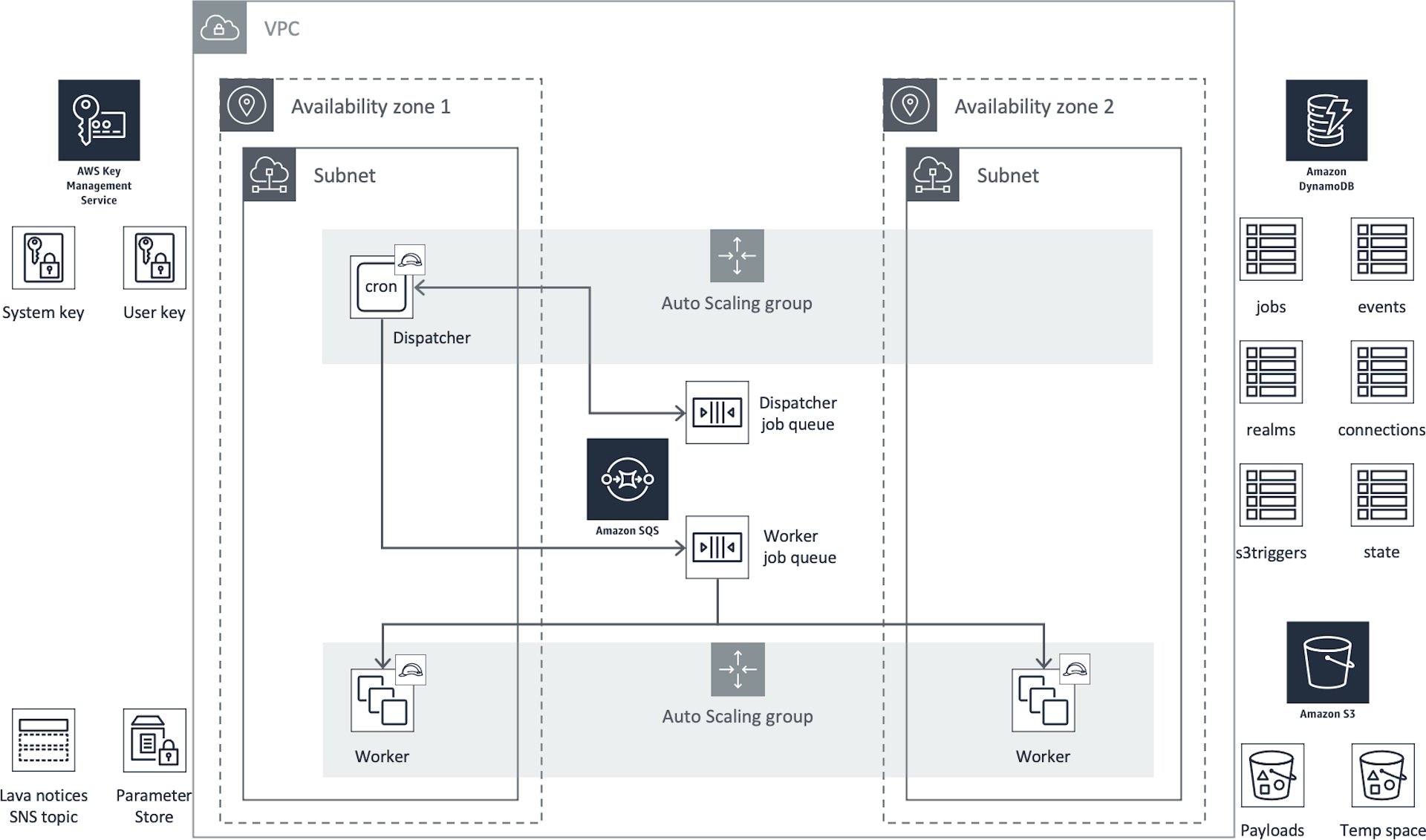
Lava S3 Locations
Each lava realm has two designated S3 locations:
-
The payload area that contains the artefacts required to run a job (scripts etc.). This location is specified by the
s3_payloadsfield in the realms table. -
The temporary area that contains outputs produced during the run of the job. This location is specified by the
s3_tempfield in the realms table. This area can be used to transfer artefacts from one job to another. It would normally have an S3 lifecycle rule to remove objects after a short period of time (e.g. 1 or 2 days).
A bucket for each realm is created by the CloudFormation templates.
SQS Queues
Dispatchers place messages for each job run on an SQS queue where it is picked up by a worker and executed.
For a given <REALM> and <WORKER>, the SQS queue name must be
lava-<REALM>-<WORKER>.
When setting up the queue, it's important to give proper consideration to the visibility timeout and message retention period properties. The visibility timeout must be long enough for workers to process jobs otherwise SQS will resubmit the message for another run before the run is finished.
An SQS queue for each worker is created by the CloudFormation templates.
Lava Workers
A lava worker is any Linux node running the worker code bundle. The worker is multi-threaded and can be run interactively, in batch mode or as a daemon.
One Linux instance can run multiple workers from the same or different worker fleets, if required. While it is possible to run workers from different realms on the one AWS EC2 instance, this is not recommended as it means the different realms would be sharing an IAM instance role.
The CloudFormation templates create a launch template and auto scaling group for each worker fleet based on the lava EC2 AMI. The worker will install the lava code from S3 and run it on boot.
Lava Dispatchers
A lava dispatcher is a Lava worker that runs lavasched jobs. Each realm must have at least one dispatcher if jobs are to run on a schedule. The lavasched job causes the crontab on the node to be rebuilt with the list of jobs and their associated schedules.
While there can be multiple dispatchers in a realm (e.g. for load sharing or for multiple timezones), each job can only be assigned to a single dispatcher. This means that a worker that also serves as a dispatcher must be a singleton. It cannot be part of an auto scaling group which allows more than one node to run.
Auxiliary Components
IAM Roles and Permissions
The realm CloudFormation templates will create a base set of IAM components, both for the lava workers and for users needing to interact with the lava environment. See Lava IAM Components.
KMS Keys
Each realm requires two AWS KMS keys:
-
lava-<REALM>-sys: The system key that should be used for things such as credentials when stored in the SSM parameter store. Workers need to be able to decrypt using this key. -
lava-<REALM>-user: The user key that should be used for encrypting data in the S3 bucket for the realm. Workers need to be able to encrypt and decrypt with this key.
These keys are created by the CloudFormation templates.
SSM Parameters
Lava connectors that require access to
confidential parameters (e.g. passwords) expect to find those in the AWS SSM
parameter store with names starting with /lava/<REALM>/. Secure string
parameters should use the lava-<REALM>-sys KMS key.
SNS Topics
Lava job actions can send SNS messages at the
completion of a job. While the standard worker IAM policy does not prevent
access to other topics, the CloudFormation
templates create a topic
lava-<REALM>-notices for general purpose notices.