The Lava Dispatch Process
The underlying mechanism for the lava job dispatch process is very simple. A
JSON formatted message containing a job ID is sent via AWS SQS to a worker. The
SQS queue for any worker is named lava-<REALM>-<WORKER>.
The worker retrieves the message, extracts the job details from the jobs table and then runs the job if it is enabled and the worker is the one named in the job specification.
There are several mechanisms that can initiate the sending of the SQS dispatch message:
Scheduled Dispatch
Dispatch events can be scheduled by a dispatcher. A dispatcher is just a
worker that runs the lavasched job type.
This job type builds a crontab containing invocations of the lava-dispatcher
utility to dispatch jobs in accordance with the schedules specified in the job
specifications.
A realm can have multiple dispatchers. For example, a realm may need to schedule jobs in multiple timezones (e.g. local and UTC) in which case there would be two dispatchers, each operating in its respective timezone. However, a given job must specify a single dispatcher.
The lavasched job must also be dispatched periodically to create and refresh the crontab. Clearly, there is a chicken and egg problem here in that an initial dispatch of the lavasched job is required to create the first crontab.
There are two ways to achieve this, manually or with a worker jump-start.
Initialising the Scheduler
The lavasched job can be dispatched
manually whenever required. When dispatching a
lavasched job, the dispatcher parameter
must be provided.
# This command will force the dispatching worker to (re-)build its crontab.
# It will include dispatches for jobs aimed at <DISPATCHER>

lava-dispatcher --realm <REALM> --worker <DISPATCH-WORKER> \
    <LAVASCHED_JOB_ID> --param dispatcher=<DISPATCHER>
The problem with this approach is for dispatchers that are started spontaneously (e.g. by an auto scaler). A manual intervention is then required to dispatch the first lavasched job or else not much lava will flow.
Jump-starting the Scheduler
The lava worker has a --jump-start option. When the worker starts, this
option forces it to search the jobs table
for any enabled lavasched jobs for which
it is the designated worker and dispatch them immediately.
This option is safe to use on any worker but does require a full scan of the jobs table.
Scheduling the Scheduler
Of course, the lavasched jobs should also have their own schedule specified to refresh the crontab as changes are made in the jobs table. It is recommended to schedule the lavasched jobs to run every 10 or 15 minutes. The job makes a reasonable effort to avoid updating the crontab when nothing has changed. It is also careful to avoid disturbing entries in the crontab that don't belong to lava.
Matching Jobs to Dispatchers
This is a typical job specification for a
lavasched job. Note the two different
dispatcher items that serve related but separate purposes.
{
  "description": "Rebuild the crontab for the dispatcher",
  "dispatcher": "Sydney",
  "enabled": true,
  "job_id": "...",
  "owner": "...",
  "parameters": {
    "dispatcher": "Sydney",
    "env": {
      "CRON_TZ": "Australia/Sydney",
      "PATH": "/usr/local/bin:/bin:/usr/bin"
    }
  },
  "payload": "--",
  "schedule": "0-59/15 * * * *",
  "type": "lavasched",
  "worker": "core"
}
Info
This PATH specification in the environment clause above is critical when
using the lava AMI. If not specified, cron will use
the default system version of Python rather than the preferred version
installed in /usr/local/bin and the dispatcher may fail. Silently.
Each lavasched job specification must contain both
-
A
dispatcherfield in the job specification.This indicates which dispatcher will dispatch the lavasched job itself.
-
A
dispatcherparameter in the job specificationsparameterobject.This indicates which jobs will be included in the crontab built by the job. It is matched against the
dispatcherfield for all jobs in the table.
Suspending the Scheduler
If there is a need to temporarily disable scheduled job dispatch from a given
dispatcher, change both of the dispatcher values in the
lavasched job specification to a value
that will not match any other job. Once the crontab updates, no jobs other than
the lavasched job will be run. This is
much simpler than changing all of the other jobs and still allows the scheduled
dispatch process to be re-enabled when required.
For example:
{
  "description": "Rebuild the crontab for the dispatcher",
  "dispatcher": "**Disabled** Sydney",
  "enabled": true,
  "job_id": "...",
  "owner": "...",
  "parameters": {
    "dispatcher": "**Disabled** Sydney",
    "env": {
      "CRON_TZ": "Australia/Sydney",
      "PATH": "/usr/local/bin:/bin:/usr/bin",
    }
  },
  "payload": "--",
  "schedule": "0-59/15 * * * *",
  "type": "lavasched",
  "worker": "core"
}
Schedule Specifications
Each job that is to be dispatched on a schedule must have a schedule field in
the job specification that is used to derive the time component of the
dispatcher crontab entries.
The value of this field is either:
-
A string containing a conventional crontab timing specification.
-
A lava scheduling object as described below.
-
A list of an arbitrary mixture of the above.
This means that one job can have multiple crontab entries to allow more complex scheduling permutations without the need to duplicate the entire job specification.
Info
The syntax of crontab strings must be compatible with the dispatch worker's
cron implementation. It is strongly recommended to avoid the non-standard
extensions to cron found on some systems. Crontab Guru
is a useful syntax helper / checker. Having said that, some of the @
forms can be useful shortcuts. The @reboot form is a bit special in that it
will be dispatched only when the dispatcher node reboots.
Lava Scheduling Objects
A lava scheduling object is a map with the following fields:
| Field | Type | Required | Description |
|---|---|---|---|
| crontab | String | Yes | A conventional crontab timing specification. |
| from | String | No | An ISO 8601 datetime string specifying when the schedule object becomes active. Default is midnight, 01/01/0001 |
| to | String | No | An ISO 8601 datetime string specifying when the schedule object ceases to active. Default is midnight, 31/12/9999 |
The from and to fields allow specific schedules to be active only within
defined time periods. If from is less than to, the schedule is active only
between those two times. If from is greater than to, the schedule is active
only outside those two times.

The from and to fields are each timezone aware. If no timezone is specified, the
local timezone of the worker running the
lavasched job is assumed.
Examples
The simplest form of schedule is a simple crontab string:
{
  ...
  "schedule": "0 12 * * Mon",
  ...
}
This one will run the job at midday on weekdays and 2pm on weekends.
{
  ...
  "schedule": [
    "0 12 * * 1-5",
    "0 14 * * 0,6"
  ],
  ...
}
This one will run the job daily at midday before 30 June 2019 and daily at 2pm after that. Note that in this example, UTC is specified in the date entries.
{
  ...
  "schedule": [
    {
      "crontab": "0 12 * * *",
      "to": "2019-06-30T00:00:00Z"
    },
    {
      "crontab": "0 14 * * *",
      "from": "2019-06-30T00:00:00Z"
    }
  ],
  ...
}
This one will run the job daily at midday, except during February 2019 when it
is not active. Note that from is greater than to in this case and the lack
of timezone means the local timezone of the worker running the
lavasched job will be used.
{
  ...
  "schedule": {
    "crontab": "0 12 * * *",
    "from": "2019-03-01T00:00:00",
    "to:": "2019-02-01T00:00:00"
  },
  ...
}
Job Initiated Dispatch
Lava has two mechanisms by which a job can dispatch other jobs.
The Dispatch Job Type
The dispatch job type initiates the dispatch of other jobs. This could be used, for example, as a step in a job chain.
The Dispatch Job Action
Job actions are conditionally executed when a job succeeds or fails. One of the available action types is the dispatch action.
The Dispatch Helper
The dispatch helper is an AWS Lambda function that provides a simplified mechanism for an external component to dispatch a lava job. It accepts simple, dispatch requests and constructs the necessary messages within the lava environment to complete the dispatch process.
The dispatch helper can accept dispatch requests via the following mechanisms:
-
SNS
-
SQS
-
Amazon EventBridge
-
direct invocation.
The standard CloudFormation template will setup an SNS topic,
lava-<REALM>-dispatch and subscribe the dispatch helper lambda function to it.
Other SNS topics or SQS queues can be created and subscribed manually as
required.
Two request formats are accepted:

CLI-Style Dispatch Requests
The dispatch request message sent to the dispatch helper must be in the following format:
# One or more lines like the following. Shell style comments and blank lines
# are ignored. Shell style lexing is applied.

<JOB_ID> [-d DURATION] [-g <GLOBAL>=<VALUE>] ... [-p <PARAM>=<VALUE> ] ...

# ... or ...

<JOB_ID> [--delay DURATION] [--global <GLOBAL>=<VALUE>] ... [--param <PARAM>=<VALUE> ] ...
For example:
# Dispatch the job "my-job" with no parameters.
my-job

# Dispatch the job "my-job" with some additional parameters.
my-job -p timeout=20m -p flow=Pahoehoe -g planet=Mars -g name='Alba Mons'

# Dispatch the job "my-job" with a delay of 3 minutes
my-job -d 3m
This is one way to send a dispatch message via the helper:
# Get the topic ARN then ...
aws sns publish \
    --topic-arn "arn:aws:sns:us-west-2:0123456789012:lava-<REALM>-dispatch" \
    --message "my-job -p timeout=20m -p flow=Pahoehoe -g planet=Mars -g name='Alba Mons'"
Parameter and Global Specifications
When specifying parameters and globals, the name can be a simple name or a dot separated hierarchical name. The dispatch helper will convert the names into a matching JSON structure that is included in the dispatch message. When the lava worker receives the dispatch message, it will merge this structure into the corresponding parameter or globals structure extracted from the jobs table.
For example, consider the following message sent to the dispatch helper:
my-job -p timeout=1h -p vars.location=Isabela -p vars.name="Sierra Negra" -g country=Equador
The dispatch message sent by the dispatch helper will contain the following.
{
    "globals": {
        "country": "Equador"
    },
    "parameters": {
        "timeout": "1h",
        "vars": {
            "location": "Isabela",
            "name": "Sierra Negra"
        }
    }
}
If the job specification in the jobs table contains the following:
{
    "globals": {
        "country": "Replaced at run time",
        "ocean": "Atlantic"
    },
    "parameters": {
        "action": "run away",
        "timeout": "20m",
        "vars": {
            "whatever": "This will be replaced"
        }
    }
}
then the final job specification used by the lava worker will be:
{
    "globals": {
        "country": "Equador",
        "ocean": "Atlantic"
    },
    "parameters": {
        "action": "run away",
        "timeout": "1h",
        "vars": {
            "location": "Isabela",
            "name": "Sierra Negra"
        }
    }
}
Notice that the parameters and globals from the dispatch helper override
similarly named parameters and globals in the job specification, including, in
this case, the entire vars map in the parameters.
JSON Dispatch Requests
JSON formatted dispatch requests must be in the following format:
{
  "job_id": "...",
  "globals": {
    "g1": "...",
    "g2": "..."
  },
  "parameters": {
    "p1": "...",
    "p2": "..."
  },
  "delay": "<DURATION>"
}
The job_id element is mandatory. All other elements are optional. The values
for individual globals and parameters can be any supported JSON type (not
just strings as shown above).
The dispatch request can be sent to the dispatch help lambda as either:
-
The body of an SQS or SNS message
-
The payload of a direct lambda invocation
-
The content of an event message produced by Amazon EventBridge.
For example, the following sends a dispatch request directly to the dispatch helper lambda using the AWS CLI.
# Send a dispatch request directly to the dispatch helper for realm <REALM>

aws lambda invoke --cli-binary-format raw-in-base64-out \
    --function-name lava-<REALM>-dispatch \
    --invocation-type Event \
    --payload '{"job_id": "my-job-id", "globals": {"g1": "GLOB1"}}' \
    /dev/stdout
See also Dispatching Jobs from Amazon EventBridge.
Dispatching Jobs from S3 Events
Lava jobs can be dispatched in response to S3 events. This is done using a realm
specific Lambda function s3trigger which, optionally, gets deployed as a
function named lava-<REALM>-s3trigger when the main realm CloudFormation stack
is deployed.
S3 event messages can be sent to the s3trigger lambda as either:
-
S3 bucket notification events delivered directly from S3, via SNS or via SQS.
-
Amazon EventBridge messages.
The following diagram shows the various event notification options supported by lava.

Note that the CloudFormation stack will deploy the function, the s3triggers table and required IAM components but it will not add any entries in the s3triggers table, nor will it add any S3 subscriptions to the lambda function. These steps must be done manually.
The s3trigger function works thus:
-
An S3 bucket notification event or Amazon EventBridge event record is passed to the Lambda function.
-
The function looks up the s3triggers table to find entries that match the bucket name and object key. There may be multiple matching entries.
-
If there is no matching s3triggers entry, the final path component of the prefix is removed and the search for matching entries is repeated. This process is repeated until either an entry is found, or all path components have been exhausted.
-
Any matching s3trigger entries with the
enabledfield set tofalseare discarded. -
For each remaining s3trigger entry, any
if_*andif_not_*conditions are evaluated. If these checks pass, the job referenced in the s3trigger entry is dispatched.
Info
Like lava jobs, s3trigger entries must be explicitly enabled in order to be active.
For example, if the bucket name is mybucket and the object key for the S3
event notification is a/b/c, the s3triggers
table will be progressively queried for
the following table entries until one is found.
- bucket=
mybucket, prefix=a/b/c - bucket=
mybucket, prefix=a/b - bucket=
mybucket, prefix=a - bucket=
mybucket, prefix=*
The final query refers to an s3triggers entry for the entire bucket (i.e. an
empty prefix). This use of * to represent an empty prefix is a consequence of
DynamoDB's inability to handle empty strings.
Note
DynamoDB has now been updated to handle empty strings but lava retains the
requirement to use a * as described above.
Query results are cached for a short period of time to reduce traffic on the s3triggers and jobs tables. The cache duration can be modified by setting the S3TRIGGER_CACHE_TTL configuration variable. The scope of the cache is limited to each run-time instance of the lambda function. This works because AWS Lambda will reuse run-time instances where possible.
Rendering of Dispatch Parameters
The s3trigger entry contains the job_id for the job to be dispatched and may also contain a map of parameters for the job and a map of globals that will be included in the dispatch.
These parameters and globals will be rendered using
Jinja unless the s3trigger entry has a jinja field
set to false. This rendering process allows information related to the S3
event, such as the bucket name and object key, to be passed to the lava job at
run time.
The parameters must be legal values for the job type being dispatched. They will be merged in with any parameters in the job specification itself.
The globals are agnostic of job type and can be provided to any job. They will be merged in with any globals in the job specification itself and made available to the Jinja rendering process of any job that uses this mechanism.
The following variables are made available to the renderer.
| Name | Type | Description |
|---|---|---|
| bucket | str | The bucket name. |
| key | str | The S3 object key. |
| event | dict[str,*] | The raw S3 event record. The format of this can vary significantly, depending on whether the event message was delivered directly from S3 or via SQS, SNS or EventBridge. Don't use it unless absolutely necessary. |
| info | dict[str,*] | A canonical extract of the most useful elements from the S3 event record. It is consistent in structure and content across the different event record delivery mechanisms and should be used instead of event. Normal Jinja syntax can be used to extract components of interest. A sample is shown below. |
| utils | dict[str,runnable] | A dictionary of utility functions that can be used in the Jinja markup. |
The info object contains the following elements:
| Name | Type | Description |
|---|---|---|
| aws_region | str | The AWS region for the S3 operation. |
| bucket | str | The bucket name. |
| event_time | datetime | A timezone aware datetime for the S3 operation. |
| event_type | str | The type of S3 operation that caused the event. See About S3 Event Types below. |
| key | str | The S3 object key. |
| size | int | The size in bytes of the object. |
| source_ip | IPv4Address | IPv6Address | The source IP address of the S3 operation. See ipaddress in the Python standard library documentation. |
A typical info (Python) object looks like this:
{
    'bucket': 'my-bucket',
    'key': 'HappyFace.jpg',
    'size': 1024,
    'event_time': datetime.datetime(2022, 1, 30, 16, 18, 17, 123, tzinfo=tzutc()),
    'source_ip': IPv4Address('10.200.240.5'),
    'event_type': 'ObjectCreated:Put',
    'aws_region': 'ap-southeast-2'
}
An s3triggers (JSON) entry may then look like this.
{
    "description": "Something interesting just happened.",
    "bucket": "...",
    "prefix": "...",
    "enabled": true,
    "globals": {
        "bucket": "{{bucket}}",
        "key": "{{key}}",
        "account-id": "{{bucket.split(':')[4]}}"
    },
    "if_fnmatch": "*.zip",
    "if_not_fnmatch": "*ignore*",
    "if_size_gt": 0,
    "job_id": "my_exe_job",
    "parameters": {
        "env": {
            "BUCKET": "{{bucket}}",
            "KEY": "{{key}}",
            "IP": "{{info.source_ip}}",
            "EVENT_TIME": "{{info.event_time.isoformat()}}"
            }
        },
    "trigger_id": "unique_trigger_id"
}
About S3 Event Types
AWS is very inconsistent in values for event types between EventBridge messages and the S3 bucket notification configuration mechanisms. Lava can't easily fix that without compounding the problem. Sorry.
For example, when an S3 object is created, the S3 bucket notification
configuration event will have an eventName field something like
ObjectCreated:Put. The EventBridge message for the same action will have a
detail-type field of Object Created and a detail.reason value of
PutObject. The other S3 event types vary even more than this.
Note
This is spectacularly unnecessary and annoying. The only saving grace is that it's rarely necessary to use this field in lava. Filtering can be done by the AWS service itself in most cases (S3 or EventBridge).
This is how lava populates the info.event_type value when Jinja rendering an
s3trigger specification:
| Source | Value for event_type |
|---|---|
| S3 | The eventName field is used as-is. |
| EventBridge | The detail-type and detail.reason fields are joined with a colon and all whitespace removed. e.g. Putting a file in S3 will yield ObjectCreated:PutObject. |
See the EventBridge message structure documentation for more information.
S3 Event Deduplication
AWS does not guarantee that an individual S3 event will generate a single event notification. Duplicate event messages are very rare, except when AWS S3 bucket replication is configured which seems to generate multiple event notifications more often.
Duplicate event notifications tend to occur within a small number of seconds of each other and can cause problems for lava jobs as two instances of a job operating on the same S3 object will be dispatched at almost the same time.
The lava s3trigger lambda provides a level of support for reducing the risk of message duplication by, optionally, caching S3 object data for received notifications and discarding duplicates. The following attributes are compared to determine if an event notification is a duplicate:
-
bucket name
-
object key
-
object size
-
event type.
The effectiveness of this mechanism is pretty good but it is limited by these factors:
-
The cache is time limited.
-
The cache is size limited.
-
As the cache is within the lambda itself, it relies on duplicate messages being received by the same warm invocation instance of the s3trigger lambda.
The caching process is disabled by default and the cache configuration is configurable via the S3TRIGGER_DEDUP_CACHE_SIZE and S3TRIGGER_DEDUP_TTL parameters.
If a more robust deduplication mechanism is required, it needs to be implemented outside lava (e.g. using a FIFO SQS queue to feed messages to s3trigger).
Warning
Be aware that the duplicate S3 event messages can have different message ID fields so some external logic would be required to explicitly set the SQS message deduplication ID if a FIFO queue is used. Are we having fun yet?
Testing S3 Triggers
Testing an S3 trigger requires that the s3trigger Lambda function is invoked with a well-formed AWS S3 bucket notification event. There are essentially three ways to do this:
-
Configure S3 or EventBridge to send the notifications appropriately and then drop the object of interest in S3. Repeating the test involves copying the object back on top of itself.
While this will work fine, it can be cumbersome to do manually, particularly if multiple objects are involved. It can also have unintended side effects if it triggers other unrelated actions.
-
Construct an Amazon EventBridge message in the appropriate format and use the AWS CLI to submit the message on the default event bus.
-
Generate artificial bucket notification events and use those to invoke the lambda directly.
Lava comes with a simple shell script
etc/s3lambda.shto do this. Runetc/s3lambda.sh -hto get help.
Configuring S3 Bucket Notification Events
The s3trigger lambda function can receive S3 bucket notification events via any of the following mechanisms:
-
Direct subscription of the lambda function to the source bucket.
-
Via SQS, where the source bucket has been configured to send event notifications to an SQS queue.
-
Via SNS, where the source bucket has been configured to send event notifications to an SNS topic.
Tip
In each case, it is strongly recommended to configure the trigger from the AWS Lambda console, not from the SNS/SQS/S3 console to avoid arcane IAM permission issues.
Configuring Amazon EventBridge for S3 Events
The process is basically this:
-
Configure the bucket to send notifications to Amazon EventBridge for all events. All events on that bucket will be sent to the default event bus.
-
Create a rule on the default event bus to capture events of interest.
- The rule name must be in the form
lava.<REALM>.*. - The event pattern should select S3 objects of interest.
- The target list must include the lambda
lava-<REALM>-s3trigger. - The rule input (i.e. what gets sent to the lambda) must be set to Matched event.
- The rule name must be in the form
An event pattern will look something like this:
{
    "source": ["aws.s3"],
    "detail-type": ["Object Created"],
    "detail": {
        "bucket": {
            "name": ["my-bucket"]
        },
        "object": {
            "key": [
                { "prefix": "an-interesting-prefix" }
            ]
        }
    }
}
Tip
The lava job framework provides built-in support for creating EventBridge rules suitable for triggering jobs from S3 events.
More information:
Dispatching Jobs from Amazon EventBridge
Amazon EventBridge is an increasingly pervasive event management and distribution tool within AWS environments. It gathers events from a number of sources, selects events of interest based on user defined criteria and sends those events to one or more targets for response / processing.
Events in an EventBridge event bus can be used to trigger the dispatch of lava jobs using the lava dispatch helper.
The lava dispatch helper is a lambda function that that can receive dispatch requests via SQS and SNS. It can also handle appropriately formatted dispatch requests sent from EventBridge directly to the dispatch helper lambda function.
The manual setup process is:
-
Go to the Amazon EventBridge console and create a new event rule.
-
Fill in the event pattern / event bus settings as required.
-
Under Select Targets, select the realm dispatch lambda function and enable Input Transformer. This requires specification of an Input Path and an Input Template.
-
The Input Path selects fields from incoming event messages and makes them available for injection into the message sent to the dispatch helper lambda function. Use it to select whatever fields from the input event are needed in the lava dispatch request.
-
The Input Template is the message that actually gets sent to the dispatch lambda. The message must be a JSON formatted object that complies with the JSON dispatch request format.
This process is automated when EventBridge rules are created using the lava job framework.
Example
As an example, consider a requirement to dispatch a lava job in response to an AWS EC2 auto scaling event, with the EC2 instance ID and auto scaling group name passed as globals to the lava job.
The auto scaling event message in the event bus looks like this:
{
  "version": "0",
  "id": "...",
  "detail-type": "EC2 Instance Launch Successful",
  "source": "aws.autoscaling",
  "account": "123456789012",
  "time": "2020-10-11T11:23:51Z",
  "region": "ap-southeast-2",
  "resources": [
    "arn:aws:autoscaling:ap-southeast2:123456789012:autoScalingGroup:...",
    "arn:aws:ec2:ap-southeast-2:123456789012:instance/i-0cefe067f7c6ee173"
  ],
  "detail": {
    "StatusCode": "InProgress",
    "AutoScalingGroupName": "myAutoScalingGroup",
    "ActivityId": "...",
    "Details": {
      "Availability Zone": "ap-southeast-2a",
      "Subnet ID": "subnet-745bae91"
    },
    "RequestId": "...",
    "EndTime": "2020-10-11T11:23:51Z",
    "EC2InstanceId": "i-0cefe067f7c6ee173",
    "StartTime": "2020-10-11T11:16:43Z",
    "Cause": "..."
  }
}
As the lava job requires the name of the auto scaling group and the affected EC2 instance ID as job globals, the Input Path would look like this:
{
  "asg_name": "$.detail.AutoScalingGroupName",
  "instance": "$.detail.EC2InstanceId"
}
The Input Template uses <input_path_var> to select values from the Input
Path. The Input Template that constructs the dispatch request looks like
this:
{
  "job_id": "my-job-id",
  "globals": {
      "instance": "<instance>",
      "asg_name": "<asg_name>"
  }
}
Testing EventBridge Dispatch
Testing of the configuration involves EventBridge receiving and processing an event that meets the selection criteria for the event rule. If it is not easy to have this occur naturally, it is straightforward to hand-craft a message and use the AWS CLI to send it.
First create a JSON formatted file (e.g. events.json) containing the event(s).
This only requires enough details to meet the EventBridge rule filtering
criteria and to support the information required to create the message for the
target.
For example:
[
  {
    "Source": "...",
    "Detail": "{ \"AutoScalingGroupName\": \"...\", \"EC2InstanceId\": \"...\" }",
    "Resources": [
      "resource1",
      "resource2"
    ],
    "DetailType": "myDetailType"
  }
]
Note that Detail is a string containing a JSON encoded object. Send the
message, thus:
aws events put-events --entries file://events.json
Direct Dispatch
The mechanism underlying the dispatch process is the placement of an appropriately formatted message onto a specific worker fleet's SQS queue. Lava provides a number interfaces for this purpose.
-
The lava-dispatcher CLI utility.
-
The lava GUI.
Warning
Do not attempt to create your own dispatch messages for posting directly on the SQS worker queue. It will end in tears. Trust me on this.
Python Dispatch Interface
The recommended way to generate a direct dispatch in Python is to use the lava libraries. Refer to the API documentation for more information.
from lava.lavacore import dispatch

run_id = dispatch(realm='...', job_id='...')
Handling of Parameters and Globals During Dispatch
In addition to specifying the job to be dispatched, dispatch messages may also contain job parameter values and named global values. Values specified in the dispatch message will override any similarly named parameter or global in the job specification.
This provides a mechanism for job specifications to be more generic, with specific values being supplied at run-time.
Job Parameters
Job parameters are job type specific and must match the requirements of the job type. The parameters for a job are determined by the following order of precedence:
-
Parameters defined in the dispatch message.
-
Parameters defined in the job specification.
Globals
Globals are not job type specific and can be provided to any job type. Moreover, globals are passed to child jobs by the chain dispatch and dag job types. Globals are also passed to downstream jobs initiated as a result of a dispatch post-job action.
This then provides a mechanism for a job to receive generic global values when dispatched (e.g. by an S3 event) which are then made available to child/downstream jobs, irrespective of job type. Global values are made available to the Jinja rendering process for any job type that supports this capability. Refer to individual job types for more information.
Global values for a job are determined by the following order of precedence (highest to lowest):
-
Globals in the dispatch message.
-
Globals in the dispatching job, if any.
-
Globals in the job specification.
Globals Owned by Lava
Global names within a job specification may not start with lava (case
insensitive). This prefix is reserved for lava's use.
Lava jobs have a concept of master job and parent job. For a simple, stand-alone job, the master job, the parent job and the current job are all one and the same. In a hierarchy of jobs formed when jobs start other jobs via chain jobs, dispatch jobs, dag jobs, or dispatch post-job actions, the master job is the initial job at the top of the hierarchy. The parent job is the job that caused the current job to run.
For a single level hierarchy resulting from a chain job, the master and parent are the same. In a multi-level hierarchy, they will differ, as shown below.
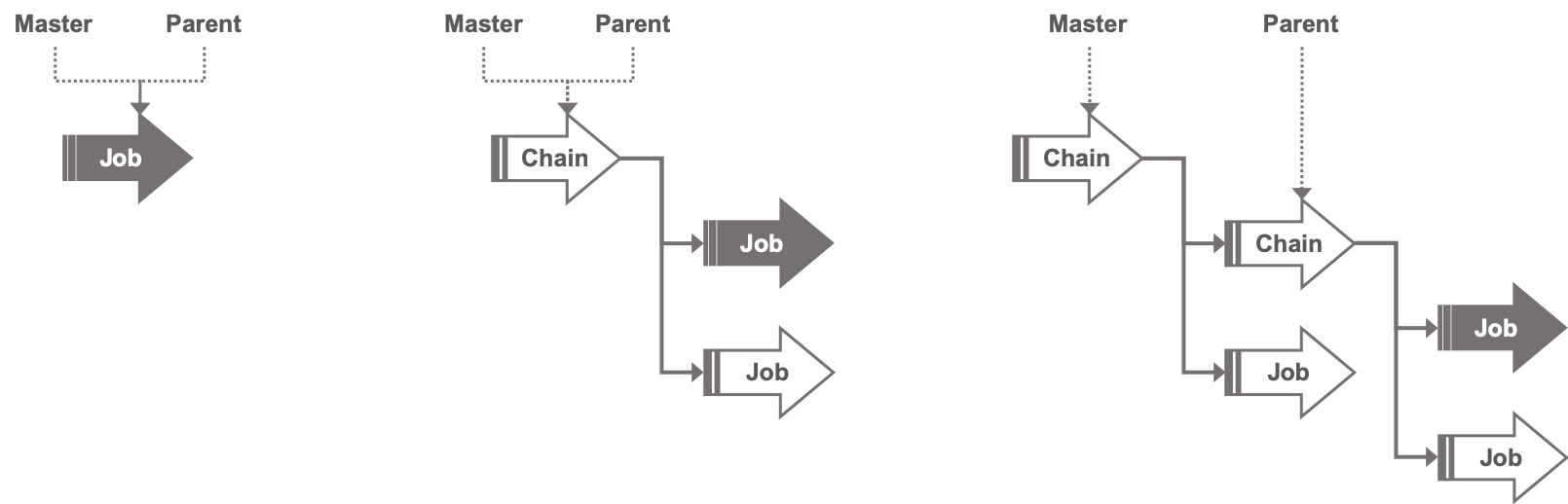
Lava adds its own globals under globals.lava that capture information relating
to the master and parent jobs.
| Name | Type | Description |
|---|---|---|
| foreach_index | int | For children of foreach jobs, this is the loop iteration counter, starting at zero. |
| iteration | int | The iteration (run attempt) number for the job. See Job Retries for more information. |
| master_job_id | str | The job_id of the master job. |
| master_start | datetime | The local start time of the master job, including timezone. |
| master_ustart | datetime | The UTC start time of the master job, including timezone. |
| parent_job_id | str | The job_id of the parent job. |
| parent_start | datetime | The local start time of the parent job, including timezone. |
| parent_ustart | datetime | The UTC start time of the parent job, including timezone. |
All jobs started from the same master job have access to the job_id of the
master job and the local and UTC timestamps for when it started. These can be
useful for constructing Jinja render values that are guaranteed to be
consistent across all jobs started from a common master (e.g. for use in
filenames).
{# This might be useful in a filename #}
{{ globals.lava.master_ustart.strftime('%Y-%m-%d') }}
Use with Event Triggered Dispatch
The s3triggers table permits the inclusion of globals which will be passed on to any jobs when dispatched. These will override similarly named globals in the job specification.